

SAFFUN
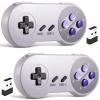
2 Pack Wireless USB SNES Controller for Windows PC, macOS (Purple/Gray)
£62.62
£104.37
-
 Order within to get between
 -
 Tracked Shipping on All Orders
-
 14-Day Returns
- Secure Payments
-
 24/7 Customer Support
Description
- USB Wireless SNES Controller. Ideal for retro emulators on Windows PC, macOS & Linux raspberry pi
- 2.4GHz Wireless: Stable 10m(33ft) range with zero-lag performance
- Plug & Play: Standard USB receiver; no drivers needed for compatible devices
- Responsive Controls: High-sensitivity buttons for precise retro gaming
- Built-in rechargeable battery, 10-hour runtime
- Incompatible with: Android TV Box, Fire TV, Chromebook, SteamOS, Tesla, C64, Switch
- What's in the box: Wireless Controller, USB receiver, Charging Cable, User manual
- Note: Not compatible with Switch due to lacking the required button configuration. Please select our dedicated Switch-compatible model.
Customers Frequently Asked Questions:
Q: 1. What can of application do I need to download to use this controller?
A: No application needed. Plug it in and your PC or Respberry Pi will recognize it.
Q: 2. Work with steam games on pc?
A: No, not support steam games.
Q: 3. Will this work for Tesla Atari games?
A: If you're using an Atari emulator on PC or Mac, then it will.
Q: 4. Can I use it to play online games?
A: No, this controller not supports online games.
Q: 5. Why my controller inputting both joystick and keyboard buttons?
A: What emulator are you using? Difficulty on mapping the buttons depends on the emulator. We recommend using SNES9X on PC, OpenEmu on Mac, Retropie on Respberry Pi.
Q: 6. After running a configuration through retroarch,when i connect the controller to my retropie/raspberry pi 2,the pi doesn't detect it.what's wrong?
A: You can try powering down and booting back up with the controllers connected. or rebuild retropie.
Q: 7. How long is the USB Charging Cable?
A: Cord is approx. 5 ft. Long.
Q: 8. Can you configure the buttons to specific keys? I want to program buttons for shortcut commands like CTRL/Z, for example.
A: This can be accomplished with 3rd party software that maps joystick buttons to keyboard controls such as Xpadder, AutoHotKey, or EventGhost.
Tips:
1. Plug in the controller first before open the emulator or power on the raspberry pi, so your device could detect the controller easily.
2. VirtuaNES is perfect emulator for Windows PC.
3. RESET the controller before the first use.
4. If you couldn't configure input correctly, please contact us and tell us your device and emulator, we could help to solve it.
Package :
2 x 2.4G Rechargeable Wireless USB Controller
2 x 2.4 GHz USB Receiver
2 x USB Charging Cable
1 x User Manual
Shipping and Returns
- We offer tracked shipping on all orders. Tracking information will be shared as soon as the order is dispatched.
- Please check the delivery estimate before adding a product to the cart. This is displayed for every product on the website.
- Available shipping methods and charges will be displayed at the time of checkout, depending on your exact location.
- All customers are entitled to a return window of 14 days, starting from the date of delivery of the product(s).
- Customers are advised to read our return policy for details of the return process, eligibility, refunds as well as cancellations or exchanges.
- In case of any issues or concerns about Shipping or Returns, please contact us and we will be happy to help.
SAFFUN.
2 Pack Wireless USB SNES Controller for Windows PC, macOS...
£62.62
£104.37