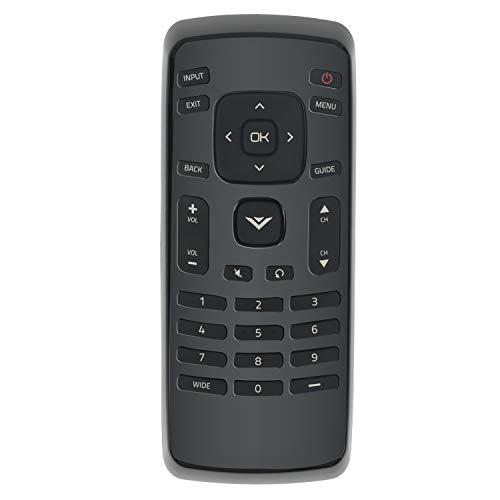
Description
- AULCMEET XRT020 Replace Remote Control Compatible with VIZIO LED HDTV: 0980-0306-0990 D24H-C1 D24HN-D1 D28H-C1 D28HN-D1 D320-B1 D32H-C0 D32HC1 D32H-C1 D32HN-D0 D32HN-D1 D32HN-E0 D32HN-E1 D32HNX-E1 D390-B0;
- D39HN-E0 D43N-E1 D48N-E0 D50N-E1 E221-A1 E231-B1 E241-A1 E241-A1W E241-B1 E280-A1 E280-B1 E291-A1 E320-A1 E320-B0 E320-B0E E320-B1 E320-B2 E320-C0E E320-B1E D55n-E2 D40n-E3;
- D24HC1 D24HND1 D28HC1 D28HND1 D32HC0 D32HND0 D32HND1 E221A1 E231B1 E241A1 E241A1W E241B1 E280A1 E280B1 E291A1 E320A1 E320B0 E320B0E E320B1 E320B2 E320C0E E320B1E;
- easy to operate; no programming required; you just need open the battery cover and install new battery to use;
- Packaging content: 1 * Remote Control;
AULCMEET XRT020 Replace Remote Control Compatible with VIZIO LED HDTV:
0980-0306-0990 D24H-C1 D24HN-D1 D28H-C1 D28HN-D1 D320-B1 D32H-C0 D32HC1 D32H-C1 D32HN-D0 D32HN-D1 D32HN-E0 D32HN-E1 D32HNX-E1 D390-B0 D39HN-E0 D43N-E1 D48N-E0 D50N-E1 E221-A1 E231-B1 E241-A1 E241-A1W E241-B1 E280-A1 E280-B1 E291-A1 E320-A1 E320-B0 E320-B0E E320-B1 E320-B2 E320-C0E E320-B1E D55n-E2 D40n-E3
D24HC1 D24HND1 D28HC1 D28HND1 D32HC0 D32HND0 D32HND1 E221A1 E231B1 E241A1 E241A1W E241B1 E280A1 E280B1 E291A1 E320A1 E320B0 E320B0E E320B1 E320B2 E320C0E E320B1E
How to use the remote control:
Step 1. Open the battery cover;
Step 2. Install new alkaline battery;
Step 3. Closed the battery house cover;
Step 4. Point the remote control to the TVs IR sensor, and make sure there is no block in front.
The remote control is easy to operate; if you have any question with it, please leave us message about it.
Packaging content: 1 * Remote Control